<?xml version="1.0" encoding="utf-8"?>
<feed xmlns="http://www.w3.org/2005/Atom">
  <title>K99K.com</title>
  
  
  <link href="/atom.xml" rel="self"/>
  
  <link href="http://k99k.com/"/>
  <updated>2016-05-03T14:01:33.000Z</updated>
  <id>http://k99k.com/</id>
  
  <author>
    <name>Keel</name>
    
  </author>
  
  <generator uri="http://hexo.io/">Hexo</generator>
  
  <entry>
    <title>坑003:也谈node.js开发中的坑</title>
    <link href="http://k99k.com/2015/nodejs-trap/"/>
    <id>http://k99k.com/2015/nodejs-trap/</id>
    <published>2015-12-09T13:12:00.000Z</published>
    <updated>2016-05-03T14:01:33.000Z</updated>
    
    <content type="html"><![CDATA[<h1 id="缘起"><a href="#缘起" class="headerlink" title="缘起"></a>缘起</h1><p>node.js因为javascript的缘故,存在各种大大小小的坑,尽管各种注意,仍然免不了中招.</p><h1 id="继承于javascript的坑"><a href="#继承于javascript的坑" class="headerlink" title="继承于javascript的坑"></a>继承于javascript的坑</h1><h2 id="弱类型"><a href="#弱类型" class="headerlink" title="弱类型"></a>弱类型</h2><ol><li>判断对象是否不存在使用if(!obj), 此时如果obj为<code>&#39;&#39;</code> 或 <code>0</code> 或 <code>false</code>,也会误认为不存在;</li><li>字符串连接,一般会自动转成string, 但不巧如果头两个正好可以转数字,那么它会按数字相加.如:<figure class="highlight plain"><table><tr><td class="gutter"><pre><div class="line">1</div><div class="line">2</div><div class="line">3</div><div class="line">4</div><div class="line">5</div></pre></td><td class="code"><pre><div class="line">var a = 1,b = &apos;b&apos;,c = 10;</div><div class="line">var s1 = a + c + b;</div><div class="line">var s2 = &apos;&apos; + a + c + b;</div><div class="line">console.log(s1); //&quot;11b&quot;</div><div class="line">console.log(s2); //&quot;110b&quot;</div></pre></td></tr></table></figure></li></ol><a id="more"></a><h1 id="node专属坑"><a href="#node专属坑" class="headerlink" title="node专属坑"></a>node专属坑</h1><h2 id="异步处理"><a href="#异步处理" class="headerlink" title="异步处理"></a>异步处理</h2><ol><li>error处理忘记return.</li><li>循环中嵌套异步方法,如果循环次数不多,可使用递归的方式解决.</li><li>一个异步方法中处理不当有可能会多次触发callback,又或者是一个callback都没触发,需要仔细处理逻辑流程.<h2 id="http"><a href="#http" class="headerlink" title="http"></a>http</h2></li><li>request结束的event</li><li>注意请求处理类型,有时候get和post方式不对,则请求看上去没有处理</li><li>做proxy转发的时候注意http的head部分,请把host填对了再转<br>4.<h2 id="错误堆栈"><a href="#错误堆栈" class="headerlink" title="错误堆栈"></a>错误堆栈</h2></li><li>node的错误堆栈有时根本看不出问题在哪,最好是自己来包装和抛出有用的错误信息,为此我写了vlog模块.<h2 id="其他"><a href="#其他" class="headerlink" title="其他"></a>其他</h2></li><li>随时添加吧…</li></ol>]]></content>
    
    <summary type="html">
    
      &lt;h1 id=&quot;缘起&quot;&gt;&lt;a href=&quot;#缘起&quot; class=&quot;headerlink&quot; title=&quot;缘起&quot;&gt;&lt;/a&gt;缘起&lt;/h1&gt;&lt;p&gt;node.js因为javascript的缘故,存在各种大大小小的坑,尽管各种注意,仍然免不了中招.&lt;/p&gt;
&lt;h1 id=&quot;继承于javascript的坑&quot;&gt;&lt;a href=&quot;#继承于javascript的坑&quot; class=&quot;headerlink&quot; title=&quot;继承于javascript的坑&quot;&gt;&lt;/a&gt;继承于javascript的坑&lt;/h1&gt;&lt;h2 id=&quot;弱类型&quot;&gt;&lt;a href=&quot;#弱类型&quot; class=&quot;headerlink&quot; title=&quot;弱类型&quot;&gt;&lt;/a&gt;弱类型&lt;/h2&gt;&lt;ol&gt;
&lt;li&gt;判断对象是否不存在使用if(!obj), 此时如果obj为&lt;code&gt;&amp;#39;&amp;#39;&lt;/code&gt; 或 &lt;code&gt;0&lt;/code&gt; 或 &lt;code&gt;false&lt;/code&gt;,也会误认为不存在;&lt;/li&gt;
&lt;li&gt;字符串连接,一般会自动转成string, 但不巧如果头两个正好可以转数字,那么它会按数字相加.如:&lt;figure class=&quot;highlight plain&quot;&gt;&lt;table&gt;&lt;tr&gt;&lt;td class=&quot;gutter&quot;&gt;&lt;pre&gt;&lt;div class=&quot;line&quot;&gt;1&lt;/div&gt;&lt;div class=&quot;line&quot;&gt;2&lt;/div&gt;&lt;div class=&quot;line&quot;&gt;3&lt;/div&gt;&lt;div class=&quot;line&quot;&gt;4&lt;/div&gt;&lt;div class=&quot;line&quot;&gt;5&lt;/div&gt;&lt;/pre&gt;&lt;/td&gt;&lt;td class=&quot;code&quot;&gt;&lt;pre&gt;&lt;div class=&quot;line&quot;&gt;var a = 1,b = &amp;apos;b&amp;apos;,c = 10;&lt;/div&gt;&lt;div class=&quot;line&quot;&gt;var s1 = a + c + b;&lt;/div&gt;&lt;div class=&quot;line&quot;&gt;var s2 = &amp;apos;&amp;apos; + a + c + b;&lt;/div&gt;&lt;div class=&quot;line&quot;&gt;console.log(s1); //&amp;quot;11b&amp;quot;&lt;/div&gt;&lt;div class=&quot;line&quot;&gt;console.log(s2); //&amp;quot;110b&amp;quot;&lt;/div&gt;&lt;/pre&gt;&lt;/td&gt;&lt;/tr&gt;&lt;/table&gt;&lt;/figure&gt;
&lt;/li&gt;
&lt;/ol&gt;
    
    </summary>
    
      <category term="node" scheme="http://k99k.com/categories/node/"/>
    
    
      <category term="node" scheme="http://k99k.com/tags/node/"/>
    
      <category term="javascript" scheme="http://k99k.com/tags/javascript/"/>
    
  </entry>
  
  <entry>
    <title>坑002:在mac上使用不同的ssh key访问不同的git服务端</title>
    <link href="http://k99k.com/2015/github-multiple-ssh-key/"/>
    <id>http://k99k.com/2015/github-multiple-ssh-key/</id>
    <published>2015-11-09T14:15:00.000Z</published>
    <updated>2015-11-09T16:34:11.000Z</updated>
    
    <content type="html"><![CDATA[<h1 id="缘起"><a href="#缘起" class="headerlink" title="缘起"></a>缘起</h1><p>一个ssh key绑定了一个github账号之后,无法再次绑定到另一个github账号,但现在需要在同一台mac上访问两个github账号下的repo,比如说一个私人的,一个工作的,怎么办?</p><h1 id="填坑"><a href="#填坑" class="headerlink" title="填坑"></a>填坑</h1><p>此坑本道祭了道 <strong>“寻龙符”</strong> 搞定! 也就是google了一下,嘿嘿,现总结如下:</p><h2 id="总体思路"><a href="#总体思路" class="headerlink" title="总体思路:"></a>总体思路:</h2><ol><li>如果需要访问两个不同的github账号的repo,则需要两个ssh key分别绑定到这两个github账号上.</li><li>需要调整ssh配置和本地git项目的remote配置,使之分别对应到不同的ssh key上去.</li></ol><a id="more"></a><h2 id="填坑法"><a href="#填坑法" class="headerlink" title="填坑法:"></a>填坑法:</h2><ol><li><p>生成一个新的ssh key,首先建议将~/.ssh目录备个份,<code>cp -r ~/.ssh ~/ssh_bak</code>,然后再执行以下指令,注意在提示保存位置时使用不同的文件名:</p><figure class="highlight"><table><tr><td class="gutter"><pre><div class="line">1</div><div class="line">2</div></pre></td><td class="code"><pre><div class="line">$ cd ~/.ssh</div><div class="line">$ ssh-keygen -t rsa -C "your_email@youremail.com"</div></pre></td></tr></table></figure><p>好了之后,.ssh目录下应该多了一对公钥和私钥,为了好举例,我再生成一个,就变成了这样:</p><figure class="highlight"><table><tr><td class="gutter"><pre><div class="line">1</div><div class="line">2</div><div class="line">3</div><div class="line">4</div><div class="line">5</div><div class="line">6</div></pre></td><td class="code"><pre><div class="line">-rw-------   1 abc  staff   179  5  2 3:06 id_rsa</div><div class="line">-rw-r--r--   1 abc  staff    10  5  2 3:06 id_rsa.pub</div><div class="line">-rw-------   1 abc  staff   326 11  9 6:12 id_rsa_abc</div><div class="line">-rw-r--r--   1 abc  staff    37 11  9 6:12 id_rsa_abc.pub</div><div class="line">-rw-------   1 abc  staff   326 11  9 6:12 id_rsa_xyz</div><div class="line">-rw-r--r--   1 abc  staff    37 11  9 6:12 id_rsa_xyz.pub</div></pre></td></tr></table></figure><p>生成之后,记得把id_rsa_abc.pub添加到对应的github账号中去.</p></li><li><p>把这两个key连同原来的key进行添加:</p><figure class="highlight"><table><tr><td class="gutter"><pre><div class="line">1</div><div class="line">2</div><div class="line">3</div></pre></td><td class="code"><pre><div class="line">$ ssh-add ~/.ssh/id_rsa</div><div class="line">$ ssh-add ~/.ssh/id_rsa_abc</div><div class="line">$ ssh-add ~/.ssh/id_rsa_xyz</div></pre></td></tr></table></figure><p>查看添加结果:</p><figure class="highlight"><table><tr><td class="gutter"><pre><div class="line">1</div></pre></td><td class="code"><pre><div class="line">$ ssh-add -l</div></pre></td></tr></table></figure></li><li><p>配置ssh的config:</p> <figure class="highlight"><table><tr><td class="gutter"><pre><div class="line">1</div></pre></td><td class="code"><pre><div class="line">$ vim ~/.ssh/config</div></pre></td></tr></table></figure><p> 内容如下:</p> <figure class="highlight"><table><tr><td class="gutter"><pre><div class="line">1</div><div class="line">2</div><div class="line">3</div><div class="line">4</div><div class="line">5</div><div class="line">6</div><div class="line">7</div><div class="line">8</div></pre></td><td class="code"><pre><div class="line">Host abc-github</div><div class="line">    HostName github.com</div><div class="line">    User git</div><div class="line">    IdentityFile ~/.ssh/id_rsa_abc</div><div class="line">Host xyz-github</div><div class="line">    HostName github.com</div><div class="line">    User git</div><div class="line">    IdentityFile ~/.ssh/id_rsa_xyz</div></pre></td></tr></table></figure><p> 注意这里第一行的Host实际上是一个别名,这个别名大有用处,第二行的HostName是真正的域名,第三行不解释,第四行就是ssh key的位置,那么如果还有更多的key,也是可以如法泡制的.</p></li><li><p>修改git项目的remote配置,这里我就直接修改<code>项目dir/.git/config</code>这个文件的remote部分了.</p><figure class="highlight"><table><tr><td class="gutter"><pre><div class="line">1</div><div class="line">2</div><div class="line">3</div></pre></td><td class="code"><pre><div class="line">[remote <span class="string">"origin"</span>]</div><div class="line">        url = git@abc-github:loyoo/testAAA.git</div><div class="line">        fetch = +refs/heads/*:refs/remotes/origin/*</div></pre></td></tr></table></figure><p>看见了没,这里用到了之前提到的 <strong>别名</strong> ,替换了原来的<code>github.com</code>,这就是解决问题的关键! 其实这样就结束了,这个项目现在就能使用id_rsa_abc来进行fetch和push操作了.</p></li></ol><h1 id="总结"><a href="#总结" class="headerlink" title="总结"></a>总结</h1><p>网上的帮助有不少,但都没直接讲清楚这个 <strong>别名</strong> 的意思,有的写成了abc.github.com,特别容易造成误会,子域名?难道我还要改下hosts?<br>其实就是别名而已.当然,如果你还有gitcafe或者oschina的账号,也是可以同上处理的.</p>]]></content>
    
    <summary type="html">
    
      &lt;h1 id=&quot;缘起&quot;&gt;&lt;a href=&quot;#缘起&quot; class=&quot;headerlink&quot; title=&quot;缘起&quot;&gt;&lt;/a&gt;缘起&lt;/h1&gt;&lt;p&gt;一个ssh key绑定了一个github账号之后,无法再次绑定到另一个github账号,但现在需要在同一台mac上访问两个github账号下的repo,比如说一个私人的,一个工作的,怎么办?&lt;/p&gt;
&lt;h1 id=&quot;填坑&quot;&gt;&lt;a href=&quot;#填坑&quot; class=&quot;headerlink&quot; title=&quot;填坑&quot;&gt;&lt;/a&gt;填坑&lt;/h1&gt;&lt;p&gt;此坑本道祭了道 &lt;strong&gt;“寻龙符”&lt;/strong&gt; 搞定! 也就是google了一下,嘿嘿,现总结如下:&lt;/p&gt;
&lt;h2 id=&quot;总体思路&quot;&gt;&lt;a href=&quot;#总体思路&quot; class=&quot;headerlink&quot; title=&quot;总体思路:&quot;&gt;&lt;/a&gt;总体思路:&lt;/h2&gt;&lt;ol&gt;
&lt;li&gt;如果需要访问两个不同的github账号的repo,则需要两个ssh key分别绑定到这两个github账号上.&lt;/li&gt;
&lt;li&gt;需要调整ssh配置和本地git项目的remote配置,使之分别对应到不同的ssh key上去.&lt;/li&gt;
&lt;/ol&gt;
    
    </summary>
    
      <category term="git" scheme="http://k99k.com/categories/git/"/>
    
    
      <category term="github" scheme="http://k99k.com/tags/github/"/>
    
      <category term="ssh" scheme="http://k99k.com/tags/ssh/"/>
    
      <category term="git" scheme="http://k99k.com/tags/git/"/>
    
  </entry>
  
  <entry>
    <title>坑001:Hexo的配置和ftpsync插件的坑</title>
    <link href="http://k99k.com/2015/hexo-ftpsync-bug/"/>
    <id>http://k99k.com/2015/hexo-ftpsync-bug/</id>
    <published>2015-11-08T07:15:00.000Z</published>
    <updated>2015-11-09T02:54:20.000Z</updated>
    
    <content type="html"><![CDATA[<h1 id="缘起"><a href="#缘起" class="headerlink" title="缘起"></a>缘起</h1><p>入Hexo之门才一天,这就踩坑了! 正是应了”凡悟道,必踩坑”之理.</p><h1 id="小坑"><a href="#小坑" class="headerlink" title="小坑"></a>小坑</h1><p>先说说头一天踩的小坑吧:</p><ol><li><p>_config.yml中的配置,这个配置文件对于字段键值的空白是尤其讲究啊!键名的冒号后面必须跟一个空格才还跟键值,否则报错.<br>如: <code>language:zh-Hans</code>错误, <code>language: zh-Hans</code>正确. 另外键名之前的空格也必须对齐,否则也报错!如:</p> <figure class="highlight"><table><tr><td class="gutter"><pre><div class="line">1</div><div class="line">2</div><div class="line">3</div><div class="line">4</div><div class="line">5</div></pre></td><td class="code"><pre><div class="line">deploy:</div><div class="line">type: git</div><div class="line">  repo: https://github.com/xyz/xyz.github.io.git</div><div class="line">  branch: master</div><div class="line">  message:</div></pre></td></tr></table></figure><p>以上错误,</p> <figure class="highlight"><table><tr><td class="gutter"><pre><div class="line">1</div><div class="line">2</div><div class="line">3</div><div class="line">4</div><div class="line">5</div></pre></td><td class="code"><pre><div class="line">deploy:</div><div class="line">  type: git</div><div class="line">  repo: https://github.com/xyz/xyz.github.io.git</div><div class="line">  branch: master</div><div class="line">  message:</div></pre></td></tr></table></figure><p>以上正确.<br>总之,这个yml文件特别地敏感脆弱,就不要欺负她了.</p></li><li>hexo配置在项目根目录下的_config.yml文件中,但别忘记了主题里面还有个配置是在thems/themName/_config.yml,这里可控制主题和显示相关的配置,嗯,是的,她们都一样敏感脆弱.</li><li>关于主题,这里注意有的主题会引入外部的字体之类,这些资源会拖慢整个页面的响应,建议找出他们并去除掉,另外配置里面一些默认为true的项目也看下是否真的需要,不需要就关掉.</li></ol><a id="more"></a><h1 id="大坑"><a href="#大坑" class="headerlink" title="大坑"></a>大坑</h1><p>ftpsync,这个必须是叫大坑了!</p><ol><li><p>插件看上去特别”简单”,但工作原理肯定与你想的不一样,它是真的就是”同步”!是把ftp的服务端目录和文件调整成本地一模一样,也就是原来服务器上的文件如果本地没有话是会被<strong>删除</strong>,<strong>删除</strong>,<strong>删除</strong>(重要的事说三遍)掉的!而不是一般deploy只负责上传的理解.我去查了hexo-deploy-ftpsync插件,它使用的是<a href="https://github.com/evanplaice/node-ftpsync" target="_blank" rel="external">node-ftpsync</a>,人家的说明里明确说了:</p><blockquote><p>This is not ftp-deploy. This application will delete files and directories on the remote server to match the local machine. Use this application in production at your own risk.</p></blockquote><p>好吧,我这下损失大了,服务器的文件还不知道去哪里找…</p></li><li><p>好吧,那我配置ignore总可以避免服务端文件被删除吧,但这个ignore简单的配置一个目录名居然不生效?那到底如何配置呢?经过多方试验,发现这里必须按如下配置:</p> <figure class="highlight"><table><tr><td class="gutter"><pre><div class="line">1</div><div class="line">2</div></pre></td><td class="code"><pre><div class="line">port: 21</div><div class="line">ignore: ['dir1','.DS_Store','file1.htm']</div></pre></td></tr></table></figure><p>注意中括号不可少.</p></li><li>下面是最大的坑了,话说最坑的必然留到最后…<br>配置好后,执行一次<code>hexo g -d</code>,好,成功生成并上传了! 慢着,趁兴致我再来个小改或者再写篇美文post一下吧,好,再次<code>hexo g -d</code>,咦?怎么报错了?<figure class="highlight plain"><table><tr><td class="gutter"><pre><div class="line">1</div><div class="line">2</div><div class="line">3</div><div class="line">4</div><div class="line">5</div><div class="line">6</div><div class="line">7</div><div class="line">8</div><div class="line">9</div><div class="line">10</div><div class="line">11</div><div class="line">12</div><div class="line">13</div><div class="line">14</div><div class="line">15</div><div class="line">16</div><div class="line">17</div><div class="line">18</div><div class="line">19</div><div class="line">20</div><div class="line">21</div><div class="line">22</div><div class="line">23</div></pre></td><td class="code"><pre><div class="line">Error: 550 ./wwwroot/2015: Cannot create a file when that file already exists.</div><div class="line">    at Ftp.parse (/Users/keel/dev/hexo/node_modules/jsftp/lib/jsftp.js:257:11)</div><div class="line">    at Ftp.parseResponse (/Users/keel/dev/hexo/node_modules/jsftp/lib/jsftp.js:174:8)</div><div class="line">    at Stream.&lt;anonymous&gt; (/Users/keel/dev/hexo/node_modules/jsftp/lib/jsftp.js:146:24)</div><div class="line">    at emitOne (events.js:77:13)</div><div class="line">    at Stream.emit (events.js:169:7)</div><div class="line">    at ResponseParser.reemit (/Users/keel/dev/hexo/node_modules/duplexer/index.js:70:25)</div><div class="line">    at emitOne (events.js:77:13)</div><div class="line">    at ResponseParser.emit (events.js:169:7)</div><div class="line">    at readableAddChunk (_stream_readable.js:146:16)</div><div class="line">    at ResponseParser.Readable.push (_stream_readable.js:110:10)</div><div class="line">    at ResponseParser.Transform.push (_stream_transform.js:128:32)</div><div class="line">    at ResponseParser.&lt;anonymous&gt; (/Users/keel/dev/hexo/node_modules/ftp-response-parser/index.js:65:12)</div><div class="line">    at Array.forEach (native)</div><div class="line">    at ResponseParser._transform (/Users/keel/dev/hexo/node_modules/ftp-response-parser/index.js:48:9)</div><div class="line">    at ResponseParser.Transform._read (_stream_transform.js:167:10)</div><div class="line">    at ResponseParser.Transform._write (_stream_transform.js:155:12)</div><div class="line">    at doWrite (_stream_writable.js:292:12)</div><div class="line">    at writeOrBuffer (_stream_writable.js:278:5)</div><div class="line">    at ResponseParser.Writable.write (_stream_writable.js:207:11)</div><div class="line">    at Socket.ondata (_stream_readable.js:528:20)</div><div class="line">    at emitOne (events.js:77:13)</div><div class="line">    at Socket.emit (events.js:169:7)</div></pre></td></tr></table></figure></li></ol><p>难道是心神不聚所致? 此时捏个 <strong>“凝神自省决”</strong> :</p><ul><li>网络–ok</li><li>配置–ok</li><li>ftpServer–ok, <strong>注意这里ftp是windows服务器,很重要!</strong> ,直接用ftp工具上传是ok的</li></ul><p>再次出手!还是报错!</p><p>好吧,看错误应该是远端的目录已经存在了无法再创建,开启 <strong>“填坑大法第一式”</strong> :查log.<br>开启ftpsync的verbose模式看看,果然够verbose,输出了一大版,原来这货是先取出远端的目录文件,再与本地的目录文件对比,然后将差异计算出来,最后执行相关的同步操作的.</p><p>仔细看了好多次,终于看出门道了,remote部分列出的目录不对!本来远端有个2015的目录,但remote的log中却只有一个5的目录,因此在计算差异时有了再次创建2015的目录的任务,但远端已经有了,所以执行时创建会失败.问题根源应该是在获取remote目录列表上了.</p><p>这是个大麻烦,很可能是个bug了,二话不说,先祭个 <strong>“寻字符”</strong> 吧,google,baidu,github狂搜一通,居然无解?那再祭起 <strong>“请神符”</strong> ,各论坛发问不提,还在github上提了相关的issue.</p><p>本想着就此等结果了,但身为踩坑道人,为平坑劫,求人先求已,心想nodejs有个好处,这些modules实际上是在自己手上,不像jar包没法动手脚,它是可以就着log追过去尝试寻下报错的根源.嗯,可以试试开启 <strong>“填坑大法第二式”</strong> :debug:<br>这个hexo-deploy-ftpsync是依赖于node-ftpsync的,而它是依赖于jsftp的,在node_modules里面找到jsftp猛下一顿console.log,尝试看下问题,<br>…历经3小时…<br>终于摸清了jsftp的ftp请求发送与接受处理流程,看来问题在接收上,jsftp还依赖一个作者的parse-listing项目,这个项目里对ftp返回内容做了解析,而这个解析是一个正则,经过验证,当目录为 <strong><em>纯数字</em></strong> 时,它会以为这是一个文件的大小,把它视作文件处理!</p><p>好吧,本道可以填坑了,先结一个 <strong>“混元补天阵”</strong> :fix. 阵眼分别是fork,git clone,patch,mocha,待到阵法达成之时,再<code>hexo g -d</code>,终于没问题了. 为了积功德,结个好的因果,遵天理,进行 <strong> <a href="https://github.com/keel/parse-listing/commit/0b130bc927afec17c593f5b276a434d0a11e6e68" target="_blank" rel="external">pull request</a> </strong> ,再对之前提的各个issue(是的,从hexo开始到jsftp所有依赖的项目里我都提了issue),做了补完.</p><p>至此,心愿已了,虽然费时甚多,但有了善果,可以愉快的睡了.</p>]]></content>
    
    <summary type="html">
    
      &lt;h1 id=&quot;缘起&quot;&gt;&lt;a href=&quot;#缘起&quot; class=&quot;headerlink&quot; title=&quot;缘起&quot;&gt;&lt;/a&gt;缘起&lt;/h1&gt;&lt;p&gt;入Hexo之门才一天,这就踩坑了! 正是应了”凡悟道,必踩坑”之理.&lt;/p&gt;
&lt;h1 id=&quot;小坑&quot;&gt;&lt;a href=&quot;#小坑&quot; class=&quot;headerlink&quot; title=&quot;小坑&quot;&gt;&lt;/a&gt;小坑&lt;/h1&gt;&lt;p&gt;先说说头一天踩的小坑吧:&lt;/p&gt;
&lt;ol&gt;
&lt;li&gt;&lt;p&gt;_config.yml中的配置,这个配置文件对于字段键值的空白是尤其讲究啊!键名的冒号后面必须跟一个空格才还跟键值,否则报错.&lt;br&gt;如: &lt;code&gt;language:zh-Hans&lt;/code&gt;错误, &lt;code&gt;language: zh-Hans&lt;/code&gt;正确. 另外键名之前的空格也必须对齐,否则也报错!如:&lt;/p&gt;
 &lt;figure class=&quot;highlight&quot;&gt;&lt;table&gt;&lt;tr&gt;&lt;td class=&quot;gutter&quot;&gt;&lt;pre&gt;&lt;div class=&quot;line&quot;&gt;1&lt;/div&gt;&lt;div class=&quot;line&quot;&gt;2&lt;/div&gt;&lt;div class=&quot;line&quot;&gt;3&lt;/div&gt;&lt;div class=&quot;line&quot;&gt;4&lt;/div&gt;&lt;div class=&quot;line&quot;&gt;5&lt;/div&gt;&lt;/pre&gt;&lt;/td&gt;&lt;td class=&quot;code&quot;&gt;&lt;pre&gt;&lt;div class=&quot;line&quot;&gt;deploy:&lt;/div&gt;&lt;div class=&quot;line&quot;&gt;type: git&lt;/div&gt;&lt;div class=&quot;line&quot;&gt;  repo: https://github.com/xyz/xyz.github.io.git&lt;/div&gt;&lt;div class=&quot;line&quot;&gt;  branch: master&lt;/div&gt;&lt;div class=&quot;line&quot;&gt;  message:&lt;/div&gt;&lt;/pre&gt;&lt;/td&gt;&lt;/tr&gt;&lt;/table&gt;&lt;/figure&gt;
&lt;p&gt;以上错误,&lt;/p&gt;
 &lt;figure class=&quot;highlight&quot;&gt;&lt;table&gt;&lt;tr&gt;&lt;td class=&quot;gutter&quot;&gt;&lt;pre&gt;&lt;div class=&quot;line&quot;&gt;1&lt;/div&gt;&lt;div class=&quot;line&quot;&gt;2&lt;/div&gt;&lt;div class=&quot;line&quot;&gt;3&lt;/div&gt;&lt;div class=&quot;line&quot;&gt;4&lt;/div&gt;&lt;div class=&quot;line&quot;&gt;5&lt;/div&gt;&lt;/pre&gt;&lt;/td&gt;&lt;td class=&quot;code&quot;&gt;&lt;pre&gt;&lt;div class=&quot;line&quot;&gt;deploy:&lt;/div&gt;&lt;div class=&quot;line&quot;&gt;  type: git&lt;/div&gt;&lt;div class=&quot;line&quot;&gt;  repo: https://github.com/xyz/xyz.github.io.git&lt;/div&gt;&lt;div class=&quot;line&quot;&gt;  branch: master&lt;/div&gt;&lt;div class=&quot;line&quot;&gt;  message:&lt;/div&gt;&lt;/pre&gt;&lt;/td&gt;&lt;/tr&gt;&lt;/table&gt;&lt;/figure&gt;
&lt;p&gt;以上正确.&lt;br&gt;总之,这个yml文件特别地敏感脆弱,就不要欺负她了.&lt;/p&gt;
&lt;/li&gt;
&lt;li&gt;hexo配置在项目根目录下的_config.yml文件中,但别忘记了主题里面还有个配置是在thems/themName/_config.yml,这里可控制主题和显示相关的配置,嗯,是的,她们都一样敏感脆弱.&lt;/li&gt;
&lt;li&gt;关于主题,这里注意有的主题会引入外部的字体之类,这些资源会拖慢整个页面的响应,建议找出他们并去除掉,另外配置里面一些默认为true的项目也看下是否真的需要,不需要就关掉.&lt;/li&gt;
&lt;/ol&gt;
    
    </summary>
    
      <category term="nodejs" scheme="http://k99k.com/categories/nodejs/"/>
    
    
      <category term="hexo" scheme="http://k99k.com/tags/hexo/"/>
    
      <category term="nodejs" scheme="http://k99k.com/tags/nodejs/"/>
    
  </entry>
  
  <entry>
    <title>在CentOS6中升级openSSH到6.7版</title>
    <link href="http://k99k.com/2015/update-openssh-6/"/>
    <id>http://k99k.com/2015/update-openssh-6/</id>
    <published>2015-11-08T01:16:21.000Z</published>
    <updated>2015-11-08T16:14:07.000Z</updated>
    
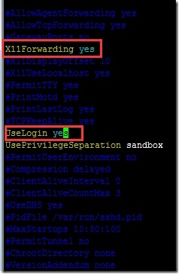
    <content type="html"><![CDATA[<h1 id="缘起"><a href="#缘起" class="headerlink" title="缘起"></a>缘起</h1><p>机房的例行漏洞扫描显示openSSH6.6及以下版本存在以下漏洞:</p><blockquote><p>“verify_host_key函数 SSHFP DNS RR 检查绕过漏洞(CVE-2014-2653),建议升级OpenSSH至6.6之后版本.”</p></blockquote><p>实际上通过yum是无法直接升级到6.6以后版本的(CentOS7好像可以直接升级到更高版本),而rpm包能成功安装的最新版本也只是6.6p1版本,唯一的办法只能通过编译安装了,而这一过程比较痛苦,因为是ssh,所以远程安装时必须先启用telnet备用,待补好后再关闭,事实证明这一步骤<strong>非常非常必要!</strong></p><p>经过三四天的折腾,成功完成了20几台服务器的升级,在此记录下:</p><a id="more"></a><h1 id="使用yum安装需要的telnet服务以及编译openssh需要的库"><a href="#使用yum安装需要的telnet服务以及编译openssh需要的库" class="headerlink" title="使用yum安装需要的telnet服务以及编译openssh需要的库"></a>使用yum安装需要的telnet服务以及编译openssh需要的库</h1><p>登录后先跳转root权限,执行以下命令:</p><figure class="highlight plain"><table><tr><td class="gutter"><pre><div class="line">1</div><div class="line">2</div><div class="line">3</div><div class="line">4</div><div class="line">5</div></pre></td><td class="code"><pre><div class="line">cd ~</div><div class="line">mkdir sshUpdate &amp;&amp; cd sshUpdate \</div><div class="line">&amp;&amp; yum install -y xinetd telnet-server make perl pam pam-devel zlib zlib-devel openssl-devel \</div><div class="line">&amp;&amp; yum install -y gcc* \</div><div class="line">&amp;&amp; vim /etc/xinetd.d/telnet</div></pre></td></tr></table></figure><p>在这里将/etc/xinetd.d/telnet(这里telnet文件名也有可能为krb5-telnet) 中的disable=yes改为no,保存退出.</p><h1 id="启动telnet服务"><a href="#启动telnet服务" class="headerlink" title="启动telnet服务"></a>启动telnet服务</h1><figure class="highlight plain"><table><tr><td class="gutter"><pre><div class="line">1</div></pre></td><td class="code"><pre><div class="line">/etc/init.d/xinetd restart &amp;&amp; vim /etc/sysconfig/iptables</div></pre></td></tr></table></figure><p>启动telnet服务并编辑iptables打开23端口,也就是telnet端口,打开后重启iptables</p><figure class="highlight plain"><table><tr><td class="gutter"><pre><div class="line">1</div></pre></td><td class="code"><pre><div class="line">service iptables restart</div></pre></td></tr></table></figure><p>此时,应该可以另开一个terminal使用telnet <ip>方式尝试登录服务器了,如果有问题,需要检查上述步骤是否有误,特别要注意23端口除了iptables限制外,还有没有上层的路由或者云主机的管理系统没有打开.</ip></p><h1 id="下载并编译安装openssh6-7p1"><a href="#下载并编译安装openssh6-7p1" class="headerlink" title="下载并编译安装openssh6.7p1"></a>下载并编译安装openssh6.7p1</h1><p>这里推荐先用yum update openssl将openssl升级,至少是1.0.1版本.<br>执行以下命令:</p><figure class="highlight plain"><table><tr><td class="gutter"><pre><div class="line">1</div><div class="line">2</div><div class="line">3</div><div class="line">4</div><div class="line">5</div><div class="line">6</div><div class="line">7</div></pre></td><td class="code"><pre><div class="line">cd ~/sshUpdate \</div><div class="line">&amp;&amp; wget http://ftp.openbsd.org/pub/OpenBSD/OpenSSH/portable/openssh-6.7p1.tar.gz &amp;&amp; mv /etc/ssh /etc/ssh.bak \</div><div class="line">&amp;&amp; rpm -e `rpm -qa | grep openssh` --nodeps \</div><div class="line">&amp;&amp; tar zxf openssh-6.7p1.tar.gz &amp;&amp; cd openssh-6.7p1 \</div><div class="line">&amp;&amp; ./configure --prefix=/usr --sysconfdir=/etc/ssh --with-pam --with-zlib --with-md5-passwords \</div><div class="line">&amp;&amp; make &amp;&amp; make install \</div><div class="line">&amp;&amp; ssh -V</div></pre></td></tr></table></figure><p>以上指令会先下载6.7的源码,然后备份ssh并卸载当前的openssh,随后将源码进行编译,这里如果执行出错,请检查第一步的相关依赖包没有通过yum安装完整,如果没有,建议更换yum源,比如用阿里的源.<br>最后一句会显示当前ssh的版本号,如果成功显示openSSH6.7p1,那基本上算是接近成功了.</p><h1 id="启用ssh服务"><a href="#启用ssh服务" class="headerlink" title="启用ssh服务"></a>启用ssh服务</h1><figure class="highlight plain"><table><tr><td class="gutter"><pre><div class="line">1</div><div class="line">2</div></pre></td><td class="code"><pre><div class="line">cp contrib/redhat/sshd.init /etc/init.d/sshd &amp;&amp; chkconfig --add sshd \</div><div class="line">&amp;&amp; service sshd start &amp;&amp; vim /etc/ssh/sshd_config</div></pre></td></tr></table></figure><p>这里将ssh服务做成开机启动并启动了sshd,打开sshd_config后,如果需要连接xshell4,则按下图进行以下修改:<br><img src="/images/openssh_sshd_config.jpg" alt="sshd"><br>保存退出后,重启sshd并查一下sshd服务是否是自启动状态:</p><figure class="highlight plain"><table><tr><td class="gutter"><pre><div class="line">1</div></pre></td><td class="code"><pre><div class="line">service sshd restart &amp;&amp; chkconfig --list sshd</div></pre></td></tr></table></figure><h1 id="关闭telnet"><a href="#关闭telnet" class="headerlink" title="关闭telnet"></a>关闭telnet</h1><p>停止telnet服务,并修改配置:</p><figure class="highlight plain"><table><tr><td class="gutter"><pre><div class="line">1</div></pre></td><td class="code"><pre><div class="line">/etc/init.d/xinetd stop &amp;&amp; vi /etc/xinetd.d/telnet</div></pre></td></tr></table></figure><p>将之前改过的disable=yes又改回去成no.<br>随后再将修改iptables将23端口关闭,并重启iptables服务.<br>至此,可以再开ssh登录,用ssh -V查看版本号.</p>]]></content>
    
    <summary type="html">
    
      &lt;h1 id=&quot;缘起&quot;&gt;&lt;a href=&quot;#缘起&quot; class=&quot;headerlink&quot; title=&quot;缘起&quot;&gt;&lt;/a&gt;缘起&lt;/h1&gt;&lt;p&gt;机房的例行漏洞扫描显示openSSH6.6及以下版本存在以下漏洞:&lt;/p&gt;
&lt;blockquote&gt;
&lt;p&gt;“verify_host_key函数 SSHFP DNS RR 检查绕过漏洞(CVE-2014-2653),建议升级OpenSSH至6.6之后版本.”&lt;/p&gt;
&lt;/blockquote&gt;
&lt;p&gt;实际上通过yum是无法直接升级到6.6以后版本的(CentOS7好像可以直接升级到更高版本),而rpm包能成功安装的最新版本也只是6.6p1版本,唯一的办法只能通过编译安装了,而这一过程比较痛苦,因为是ssh,所以远程安装时必须先启用telnet备用,待补好后再关闭,事实证明这一步骤&lt;strong&gt;非常非常必要!&lt;/strong&gt;&lt;/p&gt;
&lt;p&gt;经过三四天的折腾,成功完成了20几台服务器的升级,在此记录下:&lt;/p&gt;
    
    </summary>
    
      <category term="linux" scheme="http://k99k.com/categories/linux/"/>
    
    
      <category term="ssh" scheme="http://k99k.com/tags/ssh/"/>
    
      <category term="centos" scheme="http://k99k.com/tags/centos/"/>
    
      <category term="linux" scheme="http://k99k.com/tags/linux/"/>
    
  </entry>
  
  <entry>
    <title>从hexo开始</title>
    <link href="http://k99k.com/2015/try-hexo/"/>
    <id>http://k99k.com/2015/try-hexo/</id>
    <published>2015-11-06T16:16:21.000Z</published>
    <updated>2015-11-06T18:07:38.000Z</updated>
    
    <content type="html"><![CDATA[<h1 id="回归"><a href="#回归" class="headerlink" title="回归"></a>回归</h1><p>还是纯静态站的构建,时隔这么久,没想到nodejs倒是出了一个不错的静态blog项目 – hexo ,想当初用freemarker+fmpp实现的纯静态blog终于有了升级之日了.哦,记得那一版还是2008年1月.</p><p>就是喜欢nodejs简单,直接,纯粹.</p><p>说实话,之前对node一直报以非常怀疑的态度,如果不是因为项目的性能问题实在搞不定了,可能会错过很长时间,谁知道一旦尝试,爱不释手了…</p><p>就这样开始吧.<br><a id="more"></a></p><h1 id="开始"><a href="#开始" class="headerlink" title="开始"></a>开始</h1><figure class="highlight javascript"><table><tr><td class="gutter"><pre><div class="line">1</div><div class="line">2</div><div class="line">3</div></pre></td><td class="code"><pre><div class="line"><span class="keyword">var</span> start = <span class="function"><span class="keyword">function</span> (<span class="params"></span>)</span>&#123;</div><div class="line">  <span class="built_in">console</span>.log(<span class="string">'hello hexo.'</span>);</div><div class="line">&#125;</div></pre></td></tr></table></figure><p>嗯,就这样.</p>]]></content>
    
    <summary type="html">
    
      &lt;h1 id=&quot;回归&quot;&gt;&lt;a href=&quot;#回归&quot; class=&quot;headerlink&quot; title=&quot;回归&quot;&gt;&lt;/a&gt;回归&lt;/h1&gt;&lt;p&gt;还是纯静态站的构建,时隔这么久,没想到nodejs倒是出了一个不错的静态blog项目 – hexo ,想当初用freemarker+fmpp实现的纯静态blog终于有了升级之日了.哦,记得那一版还是2008年1月.&lt;/p&gt;
&lt;p&gt;就是喜欢nodejs简单,直接,纯粹.&lt;/p&gt;
&lt;p&gt;说实话,之前对node一直报以非常怀疑的态度,如果不是因为项目的性能问题实在搞不定了,可能会错过很长时间,谁知道一旦尝试,爱不释手了…&lt;/p&gt;
&lt;p&gt;就这样开始吧.&lt;br&gt;
    
    </summary>
    
      <category term="other" scheme="http://k99k.com/categories/other/"/>
    
    
      <category term="hexo" scheme="http://k99k.com/tags/hexo/"/>
    
  </entry>
  
</feed>